안녕하세요.
ROS2 에서 Publish, Subscribe 노드를 생성하고 통신을 테스트해보는 기초 예제입니다.
1. ROS2 패키지 생성
ros2 pkg create --build-type ament_cmake cpp_pub_sub
<사용 라이브러리 설명>
1) rclcpp
ROS2 의 C++ client 라이브러리
2) std_msgs
ROS의 메세지 타입을 표준화하여 정의
ex) int32, float32 등
2. Publisher 코드 작성
"cpp_pub.h"
#include <chrono>
#include <functional> #include <memory>
#include <string>
#include "rclcpp/rclcpp.hpp"
#include "std_msgs/msg/int32.hpp"

using namespace std::chrono_literals;

class CppPublisher : public rclcpp::Node{
public:
    CppPublisher(std::string node_name, std::string topic_name): Node(node_name), count_(0){
        publisher_ = this->create_publisher<std_msgs::msg::Int32>(topic_name, 10);
        timer_ = this->create_wall_timer( 1s, std::bind(&CppPublisher::timer_callback, this));
    }
private:
    void timer_callback(){
        auto message = std_msgs::msg::Int32();  // 메세지 타입 정의
        message.data = count_++;
        RCLCPP_INFO(this->get_logger(), "Publishing: %d", message.data);
        publisher_->publish(message);
    }
    rclcpp::TimerBase::SharedPtr timer_;
    rclcpp::Publisher<std_msgs::msg::Int32>::SharedPtr publisher_;
    int32_t count_;
}
CppPublisher 클래스는 rclcpp 라이브러리의 Node 클래스를 상속받습니다.
즉, Node 클래스의 함수들을 사용할 수 있다는 건데
publisher_ = this->create_publisher<std_msgs::msg::Int32>(topic_name, 10);
this는 CppPublisher 객체 포인터를 의미하고 -> 연산자를 통해 상속받은 Node 클래스의 create_publisher라는 함수를 사용하는 모습입니다.
다음 줄의 create_wall_timer도 마찬가지로 Node 클래스의 함수입니다.
- create_publisher()
topic 이름과 queue size를 인자로 전달해줍니다.
만약 rclcpp가 메세지를 전달할 수 있는 속도보다 publish가 더 빨리 이루어진다면, 명시한 queue size에 따라 FIFO 방식으로 오래된 메세지는 버려집니다.
- create_wall_timer()
create_wall_timer 함수를 이용하여 1초마다(1s) callback 함수를 실행시키는 timer를 만듭니다.
timer_ = this->create_wall_timer( 1s, std::bind(&CppPublisher::timer_callback, this));
이제 timer의 callback 함수를 봅시다.
void timer_callback(){
    auto message = std_msgs::msg::Int32();  // 메세지 타입 정의
    message.data = count_++;
    RCLCPP_INFO(this->get_logger(), "Publishing: %d", message.data);
    publisher_->publish(message); // Publish message
 }
먼저 메세지 타입을 32bit Int형으로 정의하고 count를 timer loop마다 한 번씩 증가시켜 메세지의 data에 담고 있습니다.
rclcpp::Publisher 객체 포인터인 publisher_로 만든 메세지를 publish 해주는 간단한 함수입니다.
★ RCLCPP_INFO()
- rclcpp 라이브러리에 정의된 logging용 매크로 함수.
- [INFO] 헤더와 함께 전달된 string이 출력된다.

- RCLCPP_DEGUG(), RCLCPP_WARN_ONCE(), RCLCPP_ERROR_SKIPFIRST() 등 severity에 따라 여러 logging 함수가 제공된다.
"cpp_pub.cpp"
main 문이 담긴 publisher의 source 파일입니다.
# include "cpp_pub_sub/cpp_pub.h"
int main(int argc, char * argv[]) {
    std::string node_name = "cpp_pub_node";
    std::string topic_name = "pub_sub_topic"; // Topic 이름- subscriber랑 동일해야함!!!
    rclcpp::init(argc, argv);
    rclcpp::spin(std::make_shared<CppPublisher>(node_name, topic_name));
    rclcpp::shutdown();
    return 0;
}
- rclcpp::init()
rclcpp 패키지를 초기화합니다.
- rclcpp::spin()
ROS node의 실행을 유지하며 event, callback을 관리하고, subscribe한 topic들을 관찰합니다.
팽이(Node)가 멈추지 않게 계속 돌려주는 것으로 이해하면 되겠습니다.
Argument로는 Node의 shared pointer를 전달하는데 make_shared()를 통해 안전하게 shared_ptr 객체를 생성합니다.
- rclcpp::shutdown()
해당 스코프에서(위 코드에서는 main 문) 생성된 모든 노드를 종료시킵니다.
3. Subscriber 코드 작성
"cpp_sub.h"
# include <functional>
# include <memory>
# include "rclcpp/rclcpp.hpp"
# include "std_msgs/msg/int32.hpp"

using std::placeholders::_1;

class CppSubscriber : public rclcpp::Node {
public:
	CppSubscriber(std::string node_name, std::string topic_name) : Node(node_name) {
		subscription_ = this->create_subscription<std_msgs::msg::Int32>( topic_name, 10,
       		std::bind(&DyrosCppSubscriber::topic_callback, this, _1));
   	 }
private:
	void topic_callback(const std_msgs::msg::Int32 & msg) const {
    	RCLCPP_INFO(this->get_logger(), "Hello ROS: %d", msg.data);
    	}
	rclcpp::Subscription<std_msgs::msg::Int32>::SharedPtr subscription_;
};
Publisher와 비슷한 구조입니다.
Subscriber를 만들고, subscribe한 topic이 들어왔을때 불러질 callback함수를 등록하는 것입니다.
★ Subscriber에게는 timer가 없습니다. Publisher가 topic으로 보낸 메세지에 따라 반응할 뿐!
- create_subscription()
subscribe할 topic 이름, queue size, callback 함수를 인자로 전달합니다.
subscription_ = this->create_subscription<std_msgs::msg::Int32>( topic_name, 10,
       		std::bind(&DyrosCppSubscriber::topic_callback, this, _1));
이때도 메세지가 너무 빨리 도착해서 Node가 따라잡을 수 없다면 (spin이 되지 않거나, spin 주기가 느릴때), queue size에 따라 FIFO 방식으로 오래된 메세지는 버려집니다.
subscriber의 callback 함수는 꽤 단순한 구조입니다.
void topic_callback(const std_msgs::msg::Int32 & msg) const {
	RCLCPP_INFO(this->get_logger(), "Hello ROS: %d", msg.data);
}
들어오는 메세지의 data를 터미널에 출력합니다.
"cpp_sub.cpp"
main문이 있는 Subscriber의 source 파일입니다.
# include "cpp_pub_sub/cpp_sub.h"

int main(int argc, char * argv[]) {
    std::string node_name = "cpp_sub_node";
    std::string topic_name = "pub_sub_topic"; // Publisher와 일치할 것!!!

    rclcpp::init(argc, argv);
    rclcpp::spin(std::make_shared<CppSubscriber>(node_name, topic_name));
    rclcpp::shutdown();

    return 0;
}
Publisher와 마찬가지로 node를 만들고 spin 시킵니다.
이때 node_name은 오타가 나도 상관 없지만, topic_name은 publisher의 것과 같아야합니다.
4. package.xml, CMakeLists.txt 수정
"package.xml"
<package format="3">
...
<depend>rclcpp</depend>
<depend>std_msgs</depend>
...
<\package>
<package> tag 사이에 rclcpp와 std_msgs에 대한 dependency를 추가합니다.
"CMakeLists.txt"
# find dependencies
find_package(ament_cmake REQUIRED)
find_package(rclcpp REQUIRED)
find_package(std_msgs REQUIRED)

include_directories(include)

add_executable(cpp_pub src/cpp_pub.cpp)
ament_target_dependencies(cpp_pub rclcpp std_msgs)
add_executable(cpp_sub src/cpp_sub.cpp)
ament_target_dependencies(cpp_sub rclcpp std_msgs)

install(TARGETS cpp_pub cpp_sub
DESTINATION lib/${PROJECT_NAME})
5. Build
처음 패키지를 생성했던 경로에서 아래 명령을 수행합니다.
colcon build --packages-select dyros_cmake
6. 두 Node 실행
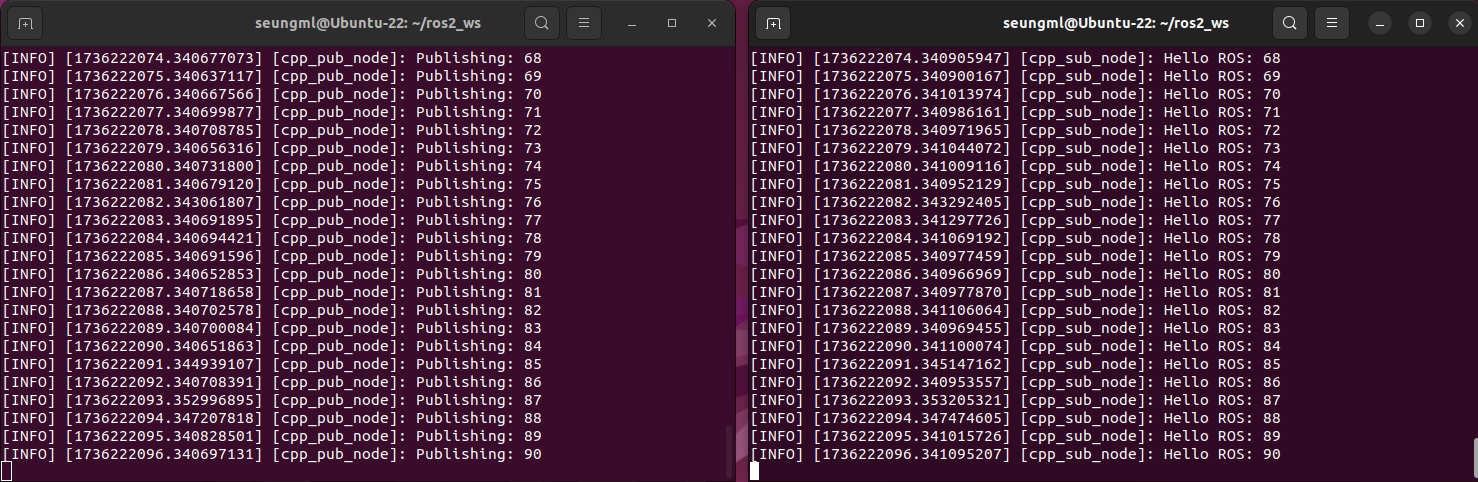
터미널 창 두 개를 열어 하나에서는 publisher, 나머지 하나에서는 subscriber의 프로그램을 실행합니다.
ros2 run cpp_pub_sub cpp_pubros2 run cpp_pub_sub cpp_sub
Build는 되는데 프로그램 실행이 안될때
source ~/.bashrc
Linux에서는 ~/.bashrc 파일이 수정된 경우 터미널을 재실행해야 적용되는데, source ~/.bashrc 명령을 통해 바로 반영할 수 있습니다.
이 명령을 실행하면 패키지가 잘 인식될 겁니다.
간단한 예제인데 기초부터 시작하는터라 코드 하나하나 분석하니 길어졌네요..
읽어주셔서 감사합니다!
'Software > Linux' 카테고리의 다른 글
| [Linux] 윈도우 VirtualBox Ubuntu 22.04 LTS + ROS 2 Humble 설치 (1) | 2025.01.04 |
|---|